Public Announcement – Not Politics but $$
I’ve been chasing a ghost, found it, killed it, exorcised it, and the sons of bitches tried it again this morning. I thought I knew where it originally came from (and it may have multiple origins), but here’s at least one that I’m sharing right now.
Long story short: I thought my cash cards had been skimmed. Oh no, nothing that simple. I activated a credit card on Saturday at 1 pm; it was declined at 2 pm. Wells Fargo caught the activity and froze the account that fast. I drove home, checked the accounts, went downstairs for a beer… and the greedy little bastards already had my mouse cursor scrolling across the screen. I caught the flicker of the screen going from black with “ScreenConnect” in white text back to normal.
Get it? Someone had control of my computer. They saw what I was doing. They were using a legitimate tech-support utility that antivirus programs like Bitdefender often don’t flag, so don’t think you’re safe just because your AV is quiet.
I got ScreenConnect removed after two hours of labor-intensive help from ChatGPT and PowerShell. We’ve been checking everything a couple of times a day since. One thing to check: open Task Manager → Services and look for ScreenConnect running. Also check your Downloads folder for ScreenConnect.ClientSetup.exe. Look for a folder in Downloads named DOC; inside it on my system was documentreader.exe.
I don’t know whether it’s waiting for you to find it and think “what’s this, let’s click and find out,” or whether it’s waiting for a reboot so it can auto-install. Either way: check now.
This is a friendly Public Service Announcement.
It went past the phishing stage into an active attack. I got it under control in a matter of hours money-wise and about a day of solid labor. I also close all accounts and opened new ones either in person or by phone and have move all online banking to my iPad (just bease it has never really been used for anything)
For most people it would just keep draining them day after day, because the attackers can see exactly what you’re doing to try to correct or protect yourself and simply adapt or re-infect on the fly.
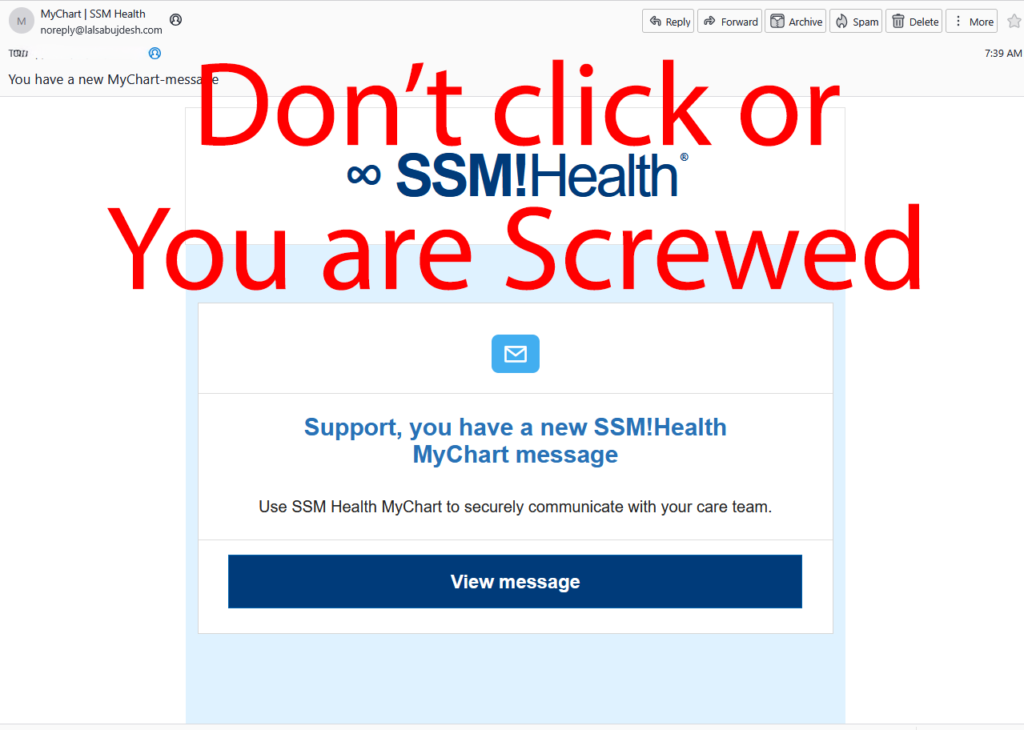
I need to note ” I didn’t fall for it,” I had previously been hacked 1.5 weeks ago, maybe by this, maybe by something else and the real danger isn’t the email, it is the ScreenConnect.
This is a classic phishing email. Do not click anything in it.Why it’s fake / dangerous
- Sender domain is completely wrong: noreply@lalsabujdesh.com
Real SSM Health / MyChart emails come from domains like @ssmhealth.com, @mychart.com, or similar official ones — never random domains like “lalsabujdesh.com”. - The branding is close enough to look legitimate at a glance (SSM Health logo + MyChart language), which is exactly how these scams work.
- The big red “Don’t click or You are Screwed” overlay you added is 100% correct. Clicking “View message” is how people get redirected to fake login pages that steal credentials, or worse — download the same kind of remote-access malware (ScreenConnect or similar) you already dealt with.
What to do right now
- Do not click the “View message” button or any links.
- Mark the email as Spam / Phishing and delete it.
- If you already clicked anything, treat it the same way you treated the ScreenConnect incident:
- Check Task Manager → Services for ScreenConnect (or anything suspicious).
- Check Downloads for ScreenConnect.ClientSetup.exe, folders named DOC, or random .exe files.
- Run a full scan with your antivirus + Malwarebytes if you have it.
- Log into the real SSM Health MyChart portal directly by typing the official address into your browser (never from an email link) and check whether there actually is a new message.
This fits the pattern you described earlier — opportunistic attacks that try to get remote control of your machine or steal login credentials. Stay paranoid; it’s working.
